
 March 18, 2026, 3:02 p.m.
What Makes a Strong Password
Passwords form the first line of defense against unauthorized access to ensure your organization's security. However, using strong passwords is often underestimated and overlooked. Windows operating systems have complex password policies; when activated, they will give you a warning when you try to enter simple passwords, forcing you to use complex passwords. While current password cracking programs can break passwords with sufficient time, guessing, and trial-and-error methods, breaking a simple password is not difficult at all.
Breaking strong passwords is more difficult and takes more time compared to breaking easy passwords.
To enable password complexity, you can follow the steps below on your own computer, or in a domain environment, you can create a new group policy to activate this.
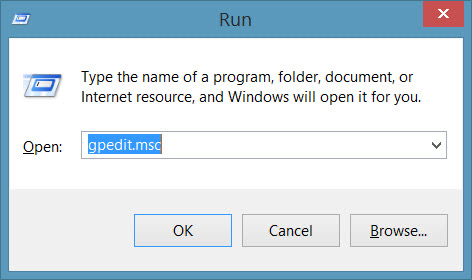
Start/Run/ gpedit.msc
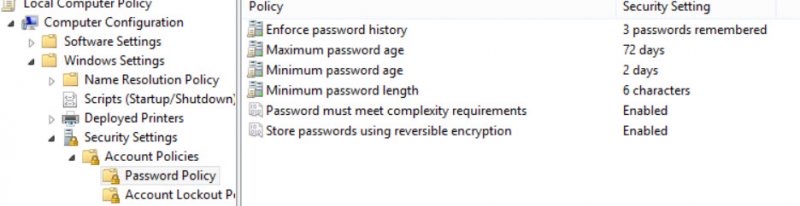
From the screen that appears Computer Configuration/Windows Settings/Security Settings/Account Policies/
Enforce password history: The section where you configure how many passwords should be remembered retrospectively. Here, you cannot reuse your last 3 passwords.
Maximum password age: You can set how many days until your password expires from this field. For example, according to my setting, I will need to change my password after 72 days.
Minimum password age: After I change my password, how many days must pass before I can change my password again. In my example, 2 days must pass before I can change my password again.
Minimum password length: Indicates the minimum required password length.
Password must meet complexity requirements: Activating the password complexity policy, which is the subject of our article. It prevents you from entering simple passwords so that your passwords can be more secure.
Store password using reversible encryption: This option helps store your passwords by encrypting them in a reversible manner.
What makes a weak password?
- Leaving the password blank
- Sticking your password on the monitor
- Contains your username, real name, or company name
- Contains a simple sentence like "Password"
What should a strong password be like?
- At least 7 characters long.
- Your password should not be stuck on the monitor
- Does not contain your username, real name, or company name.
- Does not contain a simple sentence
- Each password is different. For example: PassWord1, password2, Password3 - setting passwords by incrementing like this is not a strong password.
|
Group |
Example |
|
Uppercase characters |
A, B, C … etc. |
|
Lowercase characters |
A, b, c … etc. |
|
Numbers |
0, 1,2, 3, 4, 5, 6, 7, 8, 9 |
|
Symbols |
` ~ ! @ # $ % ^ & * ( ) _ + - = { } | : " ; ' < > ? , . / |
An example of a strong password: !(D@Vut> & <)
Some passwords may appear strong but may not actually be strong. Although Merhaba2U! seems to meet all the criteria, it is easy to crack. Instead, if you use it in the form 5@na Merhq6@!, you will have created a strong password. Besides these, using ASCII characters will also help you create a strong password. (kUµ!¶0o and Wf©$0k#»g¤5ªrd.)
What should not be forgotten is that Windows allows the use of passwords up to 127 characters long. This is 14 characters in Windows 98 and earlier versions. If you have a Windows 98 operating system in your environment, you will not be able to log in with passwords longer than 14 characters.
Wishing you success in creating strong passwords
Reference: http://technet.microsoft.com/en-us/library/cc756109%28v=ws.10%29.aspx




Similar Posts