
 July 21, 2026, 9:12 p.m.
3-2-1 Backup Strategy: How to Protect Your Data Against Ransomware?
Today, ransomware attacks are among the most critical cyber threats businesses face. Attackers can encrypt critical data, causing significant damage to organizations and threatening business continuity. One of the most effective defense mechanisms against these threats is a properly designed backup strategy. The 3-2-1 backup rule is recognized as the gold standard for securing your data and has become an indispensable part of enterprise cybersecurity policies.
In this article, we will examine in detail what the 3-2-1 backup strategy is, how to implement it, and how it can be enhanced against modern threats.
What is the 3-2-1 Backup Strategy?

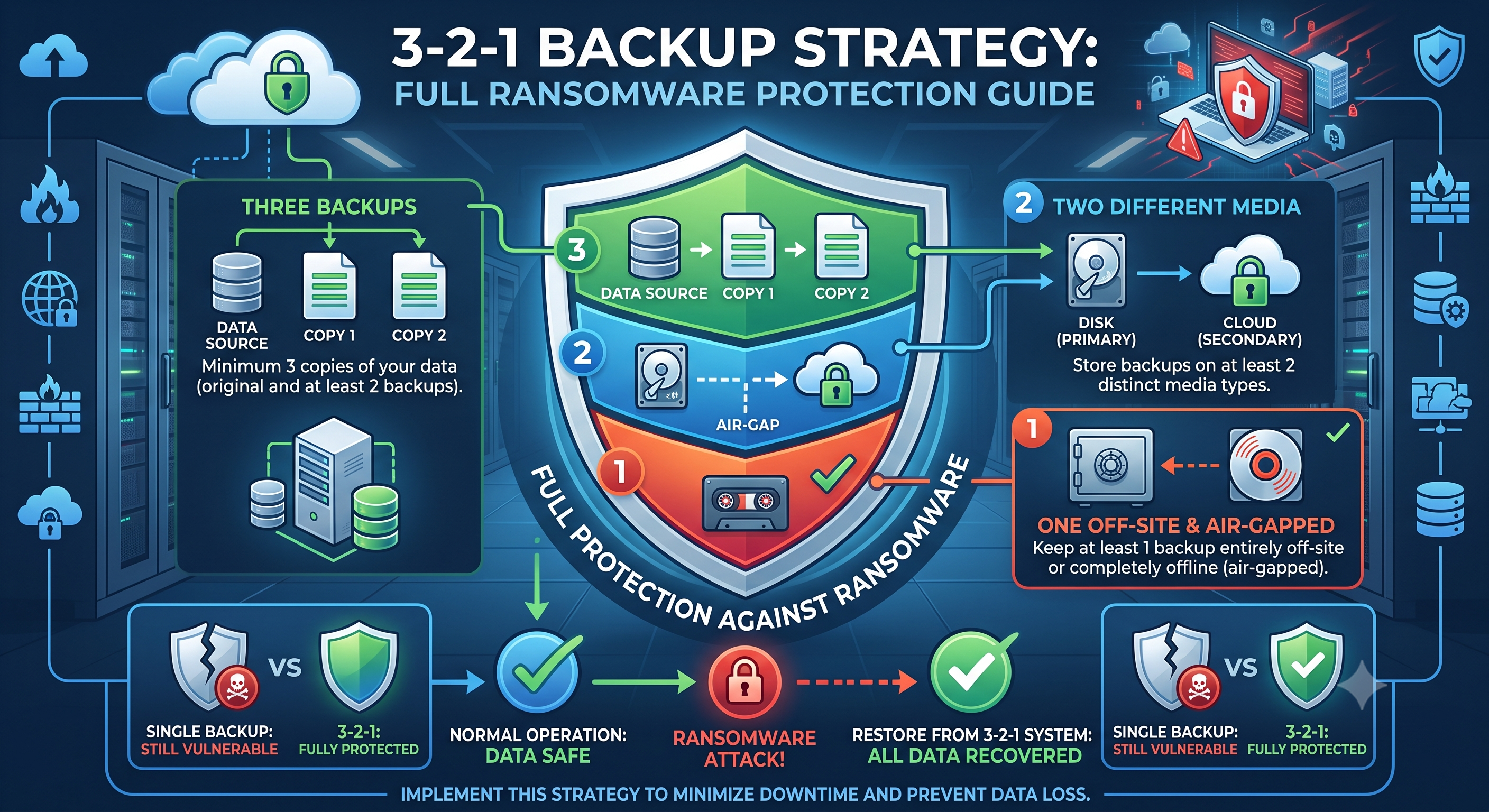
The 3-2-1 backup rule is a simple yet highly effective methodology developed to prevent data loss. This strategy is built on three fundamental principles:
- 3 copies of data: Maintain at least three copies of your data - the original data and two backup copies
- 2 different media: Store your backups on at least two different storage media (e.g., SSD, HDD, tape)
- 1 offsite location: Keep at least one backup copy in a physically different location
This approach provides comprehensive protection against various threat scenarios such as hardware failures, natural disasters, cyberattacks, and human errors. Since ransomware attacks specifically target all network-connected systems, keeping backups at different locations and accessibility levels is critically important.
Transition to the 3-2-1-1-0 Strategy for Modern Threats
While the traditional 3-2-1 rule provides a solid foundation, today's advanced ransomware attacks require additional security layers. Therefore, cybersecurity experts recommend the 3-2-1-1-0 strategy:
- 3-2-1: The basic principles explained above
- +1 Immutable copy: Store one backup copy in immutable format
- 0 Errors: Aim for zero errors in the backup process, conduct regular tests
Immutable Backup: What is Immutable Backup?
Immutable backups are backup copies that cannot be modified, deleted, or encrypted for a specific period. This feature prevents ransomware from targeting backups as well, ensuring data recovery guarantee. It can be implemented through methods such as object-lock, WORM (Write Once Read Many) technology, and air-gap backup.
Modern backup solutions create immutable snapshots, making it technically impossible for attackers to manipulate backups. This approach provides businesses with a strategic advantage by offering data recovery options without paying ransom.
Offsite Backup: Physical and Logical Separation

Offsite backup is one of the most critical components of the 3-2-1 strategy. When considering situations such as natural disasters, fires, floods, or physical attacks, having all your backups in the same physical location poses a significant risk.
Offsite Backup Options
- Cloud backup: Services like AWS, Azure, Google Cloud offer geographically distributed, highly secure storage
- Secondary data center: Dedicated backup infrastructure at a second location for enterprise level
- Tape archiving: Physically portable, network-isolated, ideal for long-term storage
- Secure storage facilities: Third-party storage centers protected with special security measures
Cloud-based backup solutions stand out in terms of cost-effectiveness and scalability, while air-gap (completely network-isolated) backup methods provide the highest security for critical data.
Backup Solutions Comparison: Veeam, Acronis, and Commvault
When implementing your enterprise-level backup strategy, choosing the right software is critically important. Let's compare the three leading solutions in the market:
Veeam Backup & Replication
Strengths: Focused on virtual environments, fast recovery times, immutable backup support, ransomware protection features. Provides excellent integration especially in VMware and Hyper-V environments.
Ideal Use: Virtual infrastructure-heavy environments, medium-to-large scale businesses, organizations with fast RTO (Recovery Time Objective) requirements.
Acronis Cyber Protect
Strengths: Integrates backup and cybersecurity features, AI-based ransomware protection, single platform for physical and virtual environments, user-friendly interface.
Ideal Use: Hybrid environments, MSPs (Managed Service Providers), SMBs seeking complete protection.
Commvault Complete Data Protection
Strengths: Enterprise-level scalability, comprehensive data management, advanced compliance features, multi-cloud support, granular recovery options.
Ideal Use: Large-scale enterprise structures, complex IT infrastructures, sectors with strict compliance requirements (finance, healthcare).
When making your selection, you should consider your existing infrastructure, budget, technical team competencies, and specific needs. As Nordis Global, we offer consultancy with our experienced team to help you determine the most suitable solution for your organization.
Backup Testing Frequency: An Unusable Backup is Not a Backup
The most overlooked but perhaps most critical aspect of your backup strategy is regular testing processes. Statistics show that 30% of businesses do not regularly test their backups and discover that their backups are unusable during a disaster.
Recommended Testing Frequency
- Daily backups: Weekly verification (automated checksums)
- Critical systems: Monthly full recovery tests



Similar Posts